
Search for Islamic apps for kids and you'll find long lists of apps, but few lists tell you how to judge them. Is there advertising? What data does it collect? Will your child get stuck behind a paywall halfway through a story? Is the religious content checked?
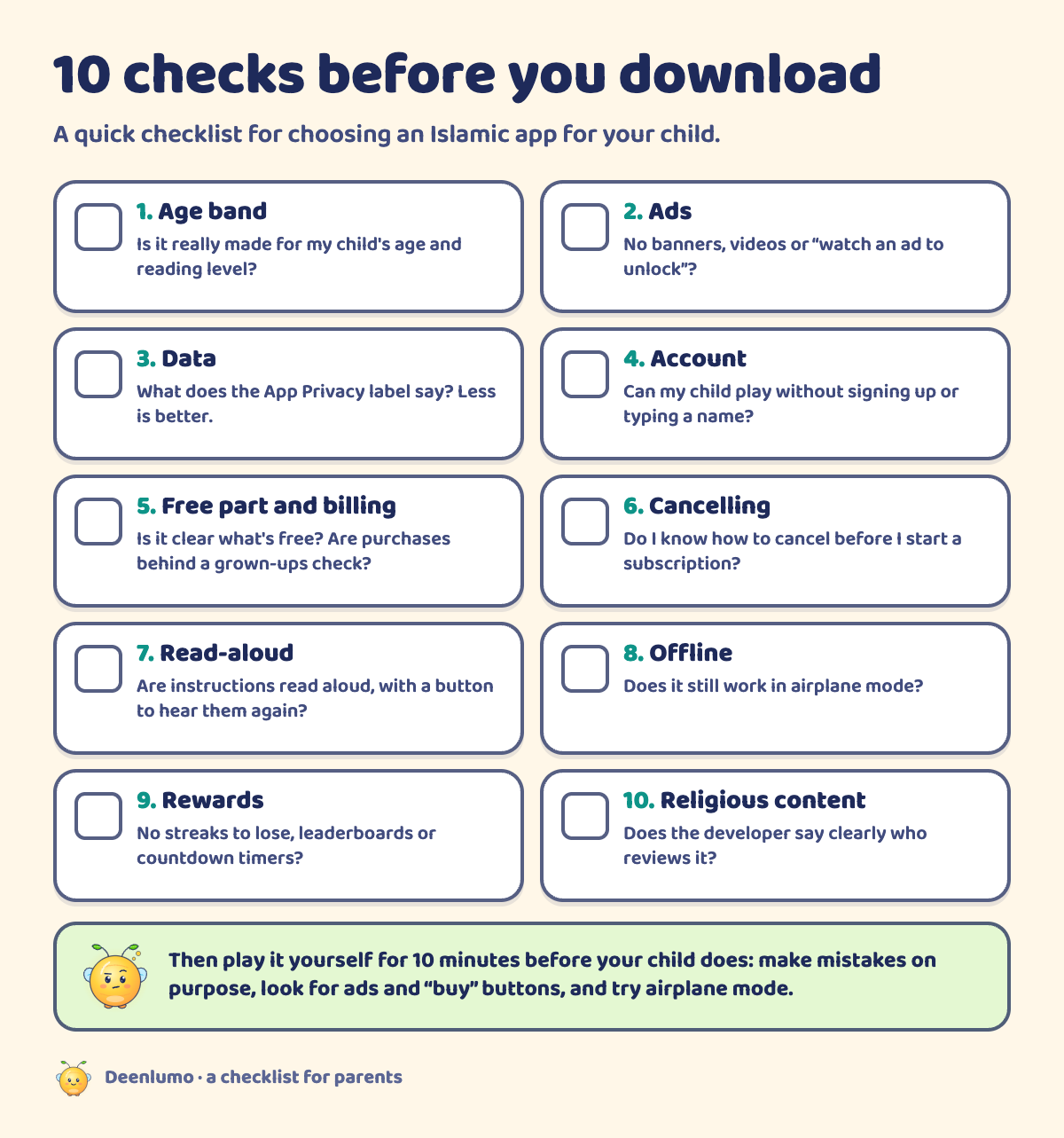
This article is a checklist, not a ranking. Here are 10 things to check before you install any Islamic app for your child, a 10-minute test you can do yourself, and, for transparency, how our own app answers each question.
If you'd like to see how we approach this, our page for parents covers ads, privacy and breaks.
Why the checklist matters
When we researched what Muslim parents say about kids' apps, the same frustrations came up again and again: ads appearing in the middle of a lesson, apps asking children to create accounts, content locked behind payments with no warning, and religious content parents weren't sure about. Others mentioned games that pushed children to keep playing with streaks or countdowns.
None of this is visible from an app's icon or its Islamic theme. A lovely-looking app can still be full of ads, and a simple-looking one can be thoughtful and safe. The only way to know is to check.
The 10 checks
1. Age band
Is the app made for your child's age? An app for "kids" may really be for toddlers or for teens. Look for a clear age range on the App Store page and in the app's description, and check that the reading level and tasks fit. A 7-year-old may be bored by an app for 3-year-olds, and frustrated by one for 12-year-olds.
2. Ads
Children's apps with ads can show banners, videos between levels, or "watch an ad to unlock" buttons. Even well-meaning ads distract from learning and can lead to other apps or websites. Check the App Store page for mentions of ads, and play the app yourself to see.
3. What data it collects (the App Store privacy label)
Every app on the App Store has a privacy label under App Privacy on its product page. It shows whether data is used to track you across other apps, what data is linked to you, and what isn't. For a children's app, less is better. "Data Not Collected" is the simplest label you can see. Read the app's privacy policy too, especially if the label lists things you didn't expect.
4. Account or no account
Does your child need to sign up, log in or type a name or email? For 6 to 8 year olds, an app that works without an account is simpler and shares less. If an account is needed, it should be created by a grown-up, not the child.
Also look at what the app lets children share. Can they chat, post pictures or see other players? For this age, a learning app rarely needs any of that, and every open channel is something you'd need to supervise.
5. Free part and how billing works
Many apps are free to download and then offer more for a price. That's fine when it's clear. Before your child plays, find out:
- What can your child do for free?
- What costs money, and is it a one-off purchase or a subscription?
- Are purchases behind a grown-ups check, so your child can't buy by accident?
- Does the app show prices or "buy now" buttons to children?
6. Cancelling
If there's a subscription, check how to cancel before you start it. On iPhone and iPad, App Store subscriptions can be managed and cancelled in the Settings app, under your name and then Subscriptions. A trustworthy app explains this plainly and doesn't hide it.
7. Read-aloud for pre-readers
Many 6 year olds are still learning to read, and even confident 8 year olds can get tired of text. Can your child play on their own because instructions are read aloud? Is there a button to hear a line again? If not, your child may need you next to them the whole time.
8. Offline use (test in airplane mode)
Some apps need the internet for everything, and some work offline once installed. It's easy to check: turn on airplane mode and open the app. Can your child still play? Offline play is handy for car journeys and visits, and it's also a hint about how much the app talks to the internet.
9. Rewards that don't pressure
Rewards can be lovely: stars, stickers, a growing garden. But some reward designs are built to keep children playing longer than they'd like, such as streaks that "break" if you miss a day, leaderboards that compare children, countdown timers, or prizes that pop up at random. Look for rewards that celebrate what your child did, without punishing them for stopping.
10. How religious content is reviewed (ask the developer)
This one matters most for an Islamic app, and it's the hardest to see from the outside. Ask the developer: who checks the Islamic content? Is any Quran, dua or hadith text shown, and who reviewed it? What happens when families' practice differs? A good developer will answer clearly and won't overclaim. Be cautious of vague phrases with no detail behind them.
It also helps to look at the tone of the religious content. For young children, a good app teaches with warmth: everyday manners, kindness, cleanliness, curiosity. Be wary of content that uses fear, threats or shame to get children to behave, or that treats one family's practice as the only correct one. And remember that an app is a support, not a teacher: your local imam, teacher and family remain the main guides.
Try it before your child does: a 10-minute parent test
Set a timer for 10 minutes and play the app yourself, as if you were your child.
- Minutes 0–2: Open it. Is there a sign-up screen? Does it ask for permissions (camera, microphone, location, notifications)?
- Minutes 2–5: Start the first activity. Are instructions read aloud? Is the level right for your child?
- Minutes 5–7: Make some mistakes on purpose. How does the app respond? Kindly, or with buzzers and lost points?
- Minutes 7–9: Look for ads, purchase buttons and "come back tomorrow" pressure.
- Minute 10: Turn on airplane mode and try again. Then close it. Does it try to stop you leaving?
Red flags at a glance. Any one of these is worth a second look before your child plays:
- An ad appears in the first few minutes.
- The app asks your child to type a name, email or photo.
- A "buy" or "unlock" button is visible on the child's screens.
- Losing a streak, a life or a place on a leaderboard is shown as a punishment.
- A countdown timer makes your child rush.
- The app asks for camera, microphone or location access without a clear reason.
- Religious text is shown with no information about who checked it.
Green lights are the opposite: a clear age range, no ads, no sign-up for children, purchases behind a grown-ups check, kind feedback on mistakes, and a developer who answers questions plainly.
If you're happy after 10 minutes, play the first session with your child. You'll learn a lot from what they enjoy and what confuses them.
How Deenlumo answers these checks
We make Deenlumo, so here is how it measures up against the checks above. We've only included what we can back up today; we'll update this table as more is confirmed.
| Check | Deenlumo |
|---|---|
| Age band | Made for children aged 6 to 8 |
| Ads | No ads |
| Data and tracking | No third-party analytics and no tracking. The app asks for no permissions. See our privacy policy |
| Account | No account and no login |
| Read-aloud | Lumo reads every instruction aloud, with a Listen button on every line |
| Rewards | No streaks to lose, no leaderboards, no countdowns, and no timers in any game |
| Purchases and settings | Settings sit behind a grown-ups check. What is free and what Deenlumo Family adds is explained on our pricing page |
| Religious content | Ask us. Our About page explains how content will be reviewed and what is still waiting for review, and our FAQ answers common questions |
FAQ
Are Islamic apps for kids safe?
Many are, but safety varies a lot from app to app. Check the age band, whether there are ads, what the App Store privacy label says, whether an account is needed and how purchases work. Then play the app yourself for ten minutes before your child does. A good Islamic theme doesn't guarantee good privacy or design.
How do I know if an app has ads?
Look at the App Store page: apps for children should say whether they contain ads, and the privacy label lists data used for advertising. Then test it yourself: play for ten minutes and watch for banners, videos between levels, or "watch to unlock" buttons. If you see one, assume your child will see many.
What does "Data Not Collected" mean?
It's a label on an app's App Store page. It means the developer has told Apple that the app does not collect data from the person using it in a way that leaves the device. It's the developer's own statement, so read the app's privacy policy too, and check that the app doesn't ask your child to sign in or type personal details.
Are free Islamic apps really free?
Some are fully free, but many are free to download and then charge for more content, a subscription, or remove ads for a price. That's fine if it's clear. Before your child plays, find out what is free, what costs money, whether purchases sit behind a grown-ups check, and how to cancel a subscription.
Read next
How we wrote this. This checklist was written by the Deenlumo team, based on our research into what Muslim parents look for in children's apps and Apple's App Store privacy labels. We don't rank or name other apps. We make Deenlumo, so we've listed only the answers we can back up today. For questions about religious content, ask your local imam or teacher as well as the developer.